
Lead safety training sessions for your whole team in four steps
The guide below provides a screen-by-screen walkthrough of Classroom / Trainer Delivery. Your trainer signs in, picks a safety video, prepares with the trainer materials, and plays the video on a projector or large TV while your employees watch together in the room.
As low as $995 per location per year on the 10-location plan.
- 300+ safety topicsStream the full video library to your group sessions
- English and SpanishMany videos are also available in Spanish
- Trainer materials includedPresenter’s guides, quizzes, and training logs
- Trusted since 2000More than 25 years in safety training
One location. Every video. Every session.
Plans are priced by the number of locations you train at, with one license and account for each location. Every plan includes all 300+ safety videos, many of them also in Spanish, and the trainer materials that come with each course.
300+ safety videos for your group sessions
Choose this planOne license per location. Each Classroom / Trainer Delivery license covers a single training location. If your company trains at more than one site, such as warehouses or plants in different cities, each location needs its own license and account. Choose the plan that matches your number of locations.
- Instant access after checkout
- Secure, encrypted payments
- Trainer materials included
Per-location prices are the yearly plan price divided by its location accounts. Training at more than 10 locations? Call (205) 600-5983 (Monday–Friday, 8 AM–5 PM CT) or email info@safetytrainingdirect.com.
Sign in and find your courses
After checkout, you’ll receive a confirmation email with your receipt and login instructions. Sign in to the Members Area, and your courses are waiting, organized by language and industry.
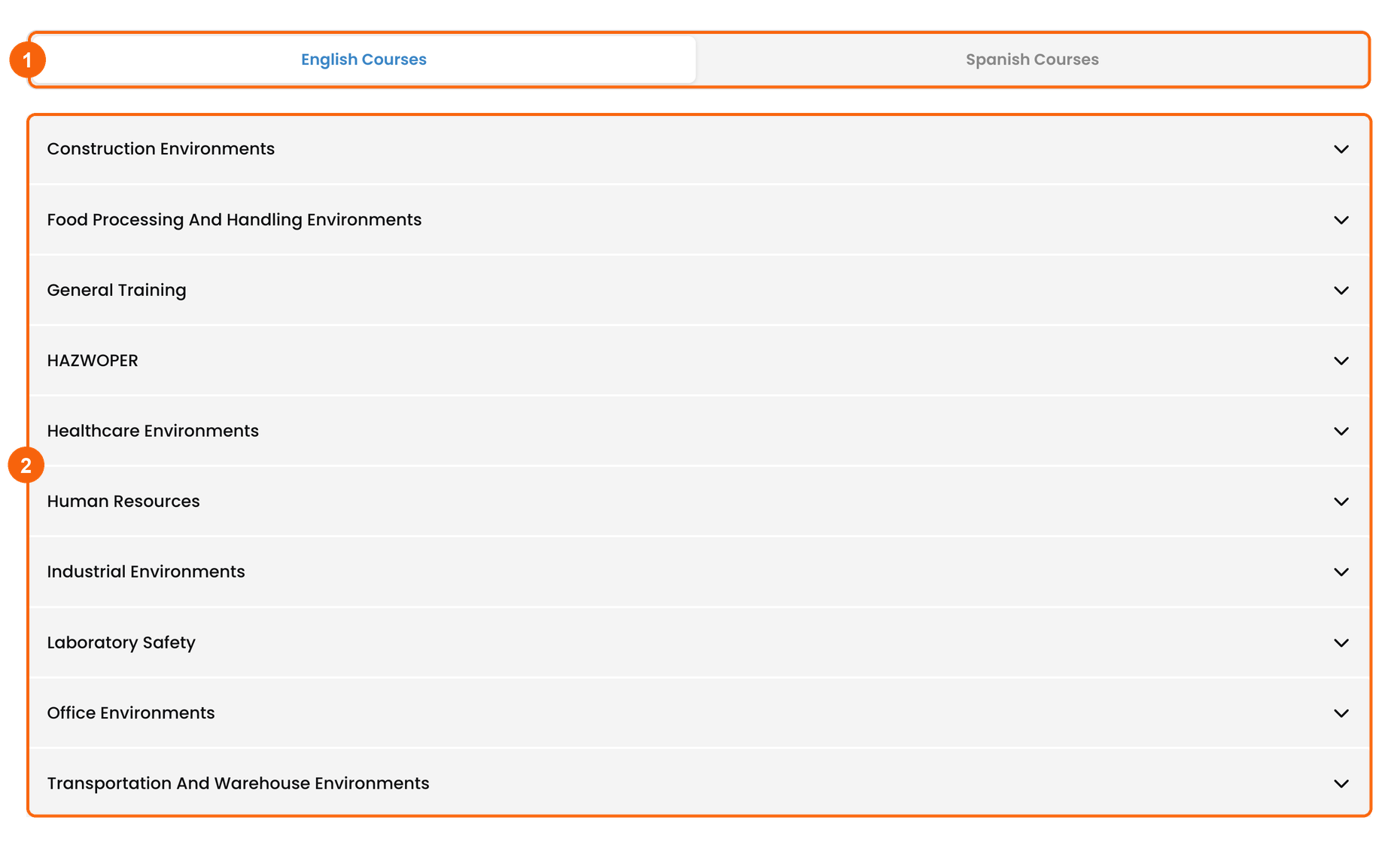
- English or Spanish: switch between the English and Spanish course lists.
- Industry sections: open an industry, such as Construction Environments, to see its courses.
No employee setup needed. With Classroom / Trainer Delivery, your employees don’t need their own accounts. There’s nothing to manage or assign: your trainer plays the videos and your team watches together.
Choose a course and prepare your session
Open an industry to see its courses. Each one shows its trainer materials, its status, and, once it’s finished, a certificate to download.
Your course list
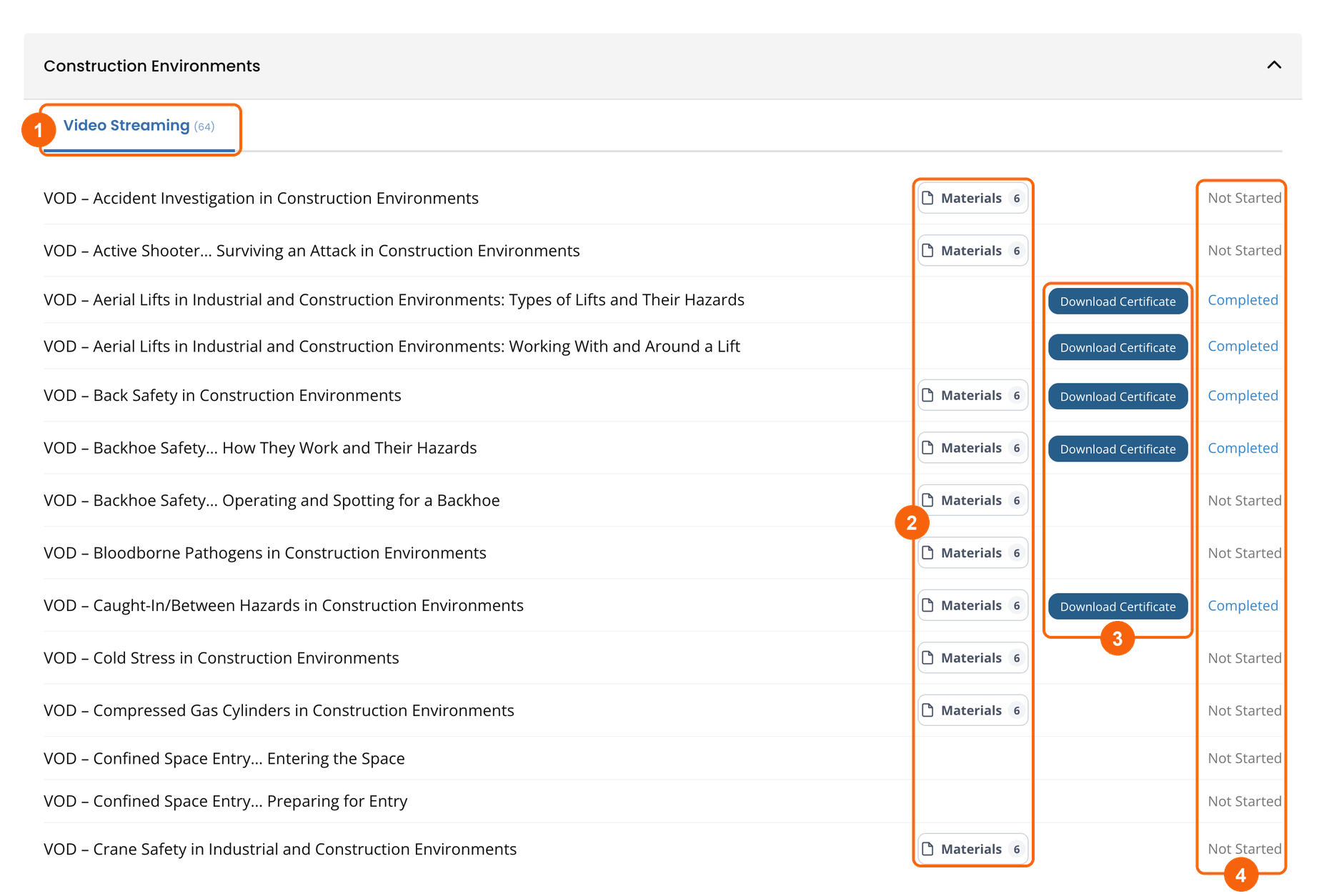
- Video Streaming tab: the courses in that industry, with the number of courses beside it.
- Materials: the course’s trainer materials, with the number of files. This button appears on every course that has materials.
- Download Certificate: appears once a course is completed.
- Status: where each course stands, such as Not Started or Completed.
Download the trainer materials
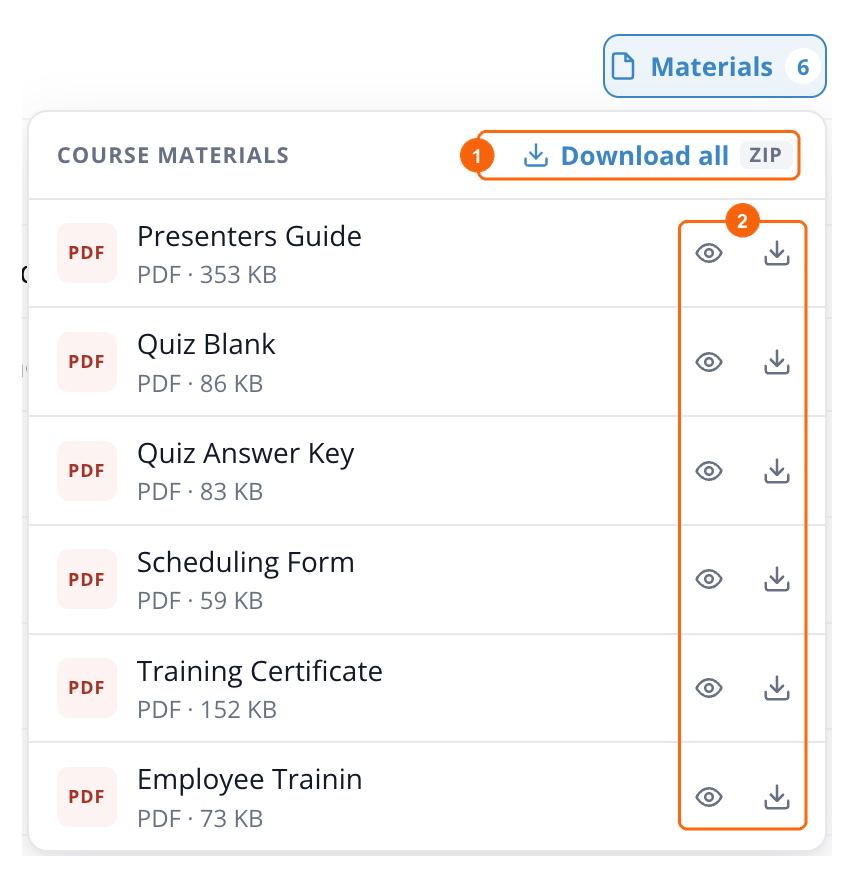
Click Materials on any course to open its file list.
- Download all: get every file for the course in a single ZIP.
- View or download any single file: the eye icon opens it in your browser, the arrow saves it.
A typical course includes:
- Presenters Guide to lead the session and discussion.
- Scheduling Form to plan when each session takes place.
- Quiz Blank and Quiz Answer Key to check what your team understood.
- Training Certificate to give each employee who attends.
- Employee Training Log to record who attended.
Before the session: read the Presenters Guide, then print one quiz for each employee and a copy of the Employee Training Log for everyone to sign.
Play the video on the big screen
Gather your team in a training room, break room, or hall. Your trainer connects a laptop or computer to a projector or large TV and plays the course video for everyone to watch together.
Set up the room
- A laptop or computer with a reliable internet connection.
- A projector or large TV, connected with an HDMI cable or screen sharing.
- Speakers loud enough for the whole room to hear.
- Printed materials from Step 2: quizzes and the Employee Training Log.
Test before your team arrives. Open the course, play a few seconds, and check the picture and sound from the back of the room.
Open the course and play the video
Click a course name in your course list to open its course page. Course pages are available only to signed-in members.
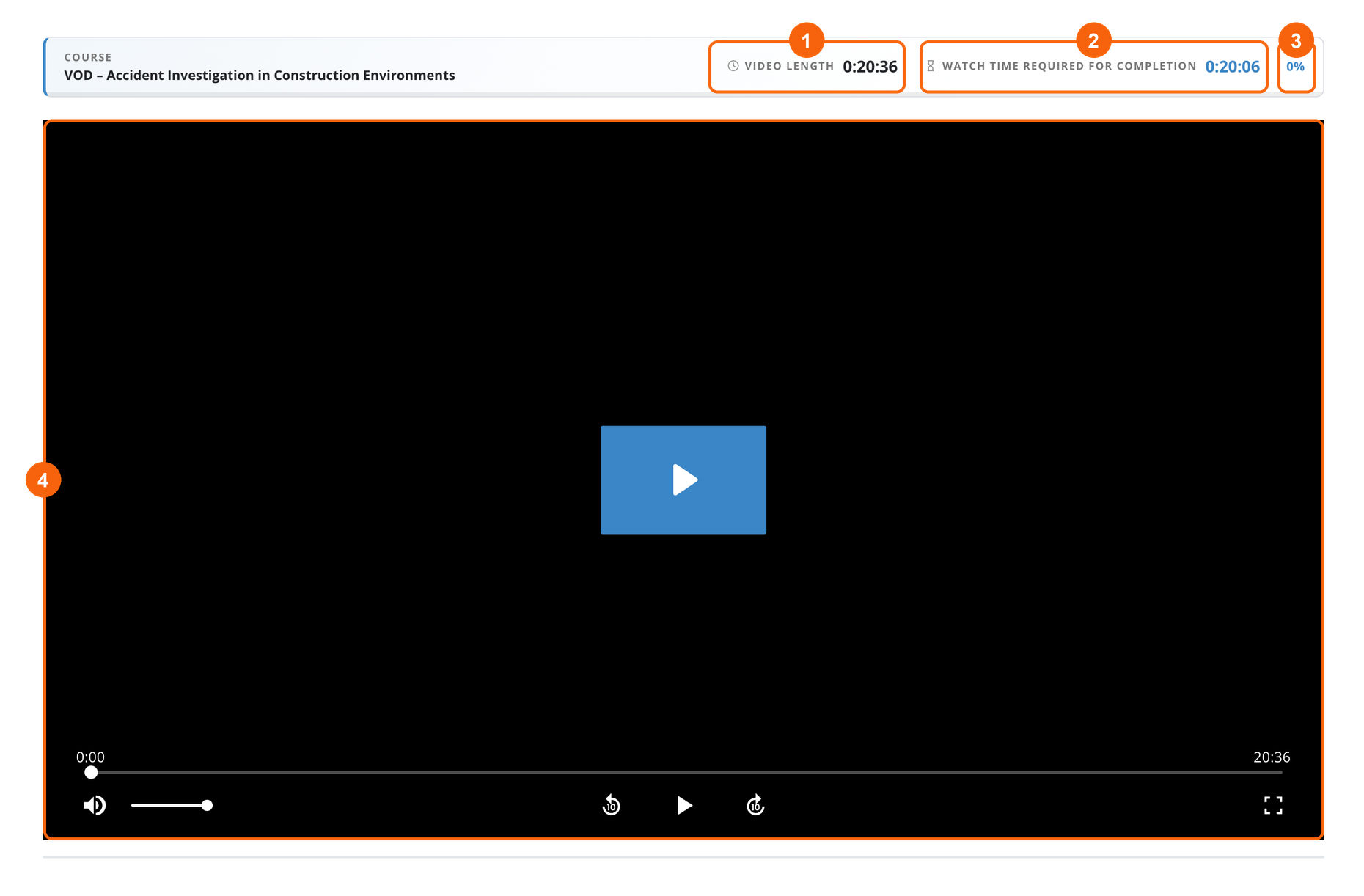
- Video length: the full running time of the course video, so you can plan the session.
- Watch time required for completion: the video length minus 30 seconds. Once it’s reached, the course can be marked complete.
- Progress: how much of the required watch time is done.
- The video player: play, pause, skip back or forward 10 seconds, and change the volume. Click the full-screen button so the video fills the projector or TV.
How a course is completed: play the course video until the required watch time is reached, which is the full video minus 30 seconds. The course can then be marked complete. It doesn’t happen automatically. Once marked complete, the course shows as Completed in your course list and its certificate becomes available to download.
The same materials, on the course page
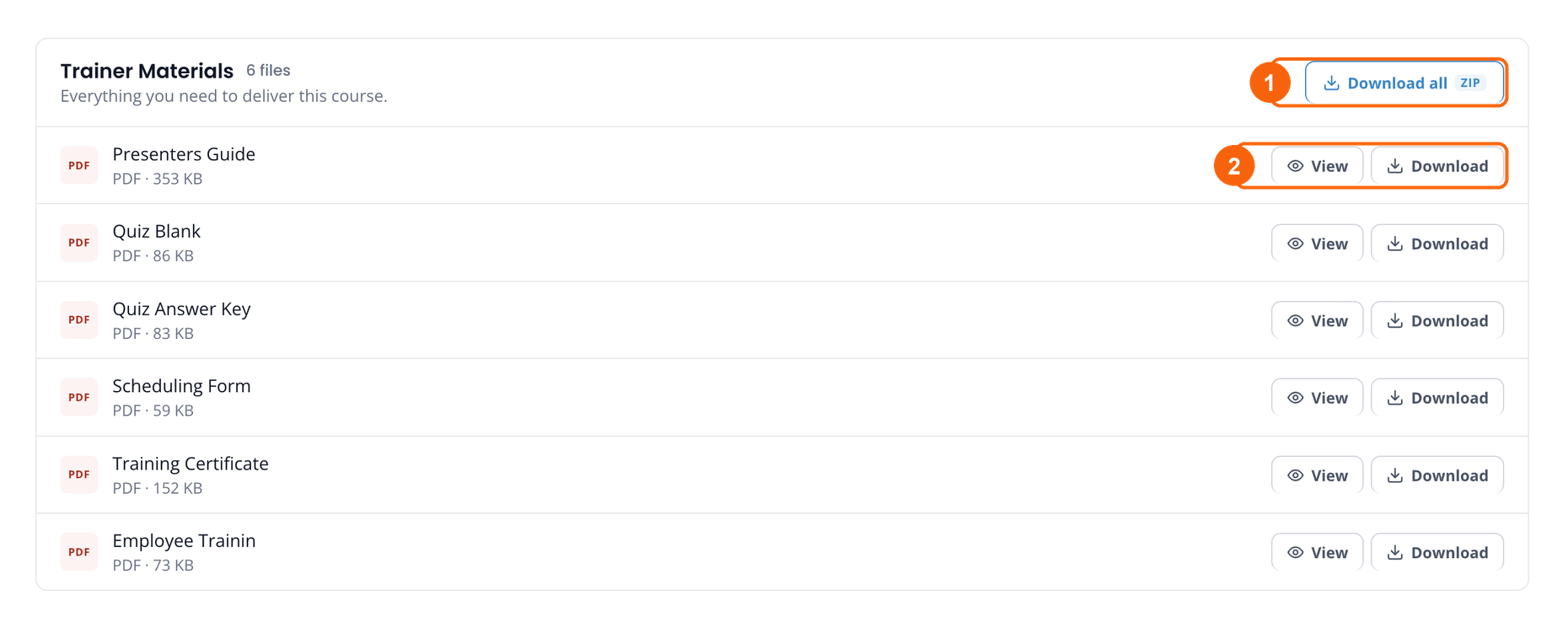
The trainer materials are also listed on the course page, under the video, so the Presenters Guide is close at hand during the session.
- Download all: every file for the course in a single ZIP.
- View or Download any single file.
Record the training and keep audit-ready records
Because your employees watch together instead of signing in, your records come from the session itself. The trainer materials give you everything you need.
- Hand out the quiz after the video, then check the answers with the Quiz Answer Key.
- Have everyone sign the Employee Training Log so you have a record of who attended and when.
- Give each employee a Training Certificate for the course they completed.
- Mark the course complete once the required watch time is reached, then use Download Certificate in your course list to keep the course certificate with your records.
Preparing for an audit? Keep each session’s signed training log, quizzes, and certificates together, filed by course and date, so you can show who was trained on what and when.
One location, every safety topic
A single location account gives that location all 300+ safety videos and their trainer materials for a full year.
Answers before you buy
How quickly can we hold our first session?
Right away. Access is instant after checkout, and you’ll receive a confirmation email with your invoice and login instructions. Sign in, pick a course, download its materials, and you’re ready to train.
Do my employees need their own accounts?
No. With Classroom / Trainer Delivery, your trainer signs in and plays the videos while your employees watch together, so there are no employee accounts to set up, manage, or assign courses to.
If you’d rather each employee watch on their own and have their progress tracked individually, see how Unlimited Video Streaming works or how Unlimited Online Training works.
How many location accounts do I need?
One for each location where you hold training. Each license covers a single location, such as a plant, warehouse, or office, and comes with its own login. If your company trains at sites in different cities, each site needs its own license.
Plans range from 1 to 10 locations. For more than 10, contact us.
What equipment do I need?
A laptop or computer with a reliable internet connection, a projector or large TV connected by HDMI cable or screen sharing, and speakers the whole room can hear. A printer is handy for the quizzes, training logs, and certificates.
What are the trainer materials?
Many courses come with printable PDFs for running a session: a Presenters Guide, a Quiz Blank and Quiz Answer Key, a Scheduling Form, a Training Certificate, and an Employee Training Log.
Open them from the Materials button in your course list or from the Trainer Materials panel on the course page. Download files one at a time, or all at once as a ZIP.
How do I record who attended?
Use the course’s Employee Training Log: have everyone sign it at the session. Add each employee’s quiz, checked against the Quiz Answer Key, and give each one a Training Certificate. Keep these together with the course certificate from your course list.
What counts as completing a course?
Each course page shows the video length and the watch time required for completion, which is the full video minus 30 seconds. Once the required watch time is reached, the course can be marked complete. It isn’t marked automatically. After that, the course shows as Completed and its certificate becomes available.
Can we train in Spanish?
Yes, for many courses. In the Members Area, open the Spanish Courses tab to see the courses available in Spanish.
How is this different from Video Streaming and Online Training?
- Classroom / Trainer Delivery: a trainer plays the videos to a group. No employee accounts, with trainer materials for running each session.
- Unlimited Video Streaming: each employee has their own account and watches on their own, and you assign courses and track progress in the Members Area.
- Unlimited Online Training: each employee takes interactive courses, answering questions to move on, with progress and scores tracked.
Your first session can start today
300+ safety videos (many also in Spanish) and the trainer materials to run every session, in one yearly subscription.
- As low as $995 per location per year
- Instant access after checkout
- Secure, encrypted payments